
Publishing useful articles is only one part of building an effective SEO website. Those articles also need meaningful connections.
A website may contain an excellent pillar guide, several detailed blog posts, useful tools and strong commercial pages. However, when these resources sit in isolation, visitors may struggle to find the next useful page and search engines may have less contextual information about how the pages relate.
That is the role of internal linking.
An effective internal linking SEO strategy connects pages according to their subject, purpose and place in the user journey. It helps readers move from a broad question to a detailed answer, from a problem to a tool, or from research to an appropriate service.
Google explains that links help it discover new pages and determine page relevance. It also recommends using crawlable links and concise, descriptive anchor text that gives readers a clear expectation of the destination.
The goal, therefore, is not to add the highest possible number of internal links. It is to create a logical network in which every link has a useful reason to exist.
What Is Internal Linking in SEO?
An internal link connects one page on a website to another page on the same website.
Examples include:
- A Blog Post Linking To A Related Guide;
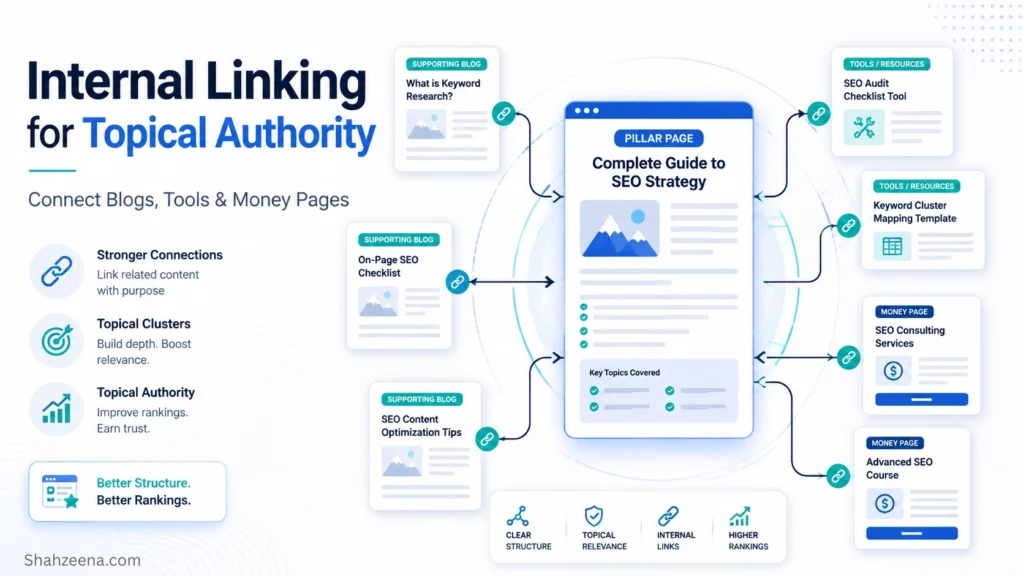
- A Pillar Page Linking To Supporting Articles;
- A Tutorial Linking To A Free Tool;
- A Comparison Article Linking To A Relevant Service Page;
- A Category Page Linking To Its Most Important Resources.
Internal links generally appear in two forms.
Navigational links are part of menus, breadcrumbs, footers, category sections and other repeated website elements.
Contextual links appear inside the main content. They connect a phrase, example or recommendation to another page that helps the reader understand or act on the subject.
Both forms are useful, but contextual links are particularly valuable for explaining the relationship between two pages. The surrounding sentence, section heading and anchor text help establish why the destination is relevant.
How Internal Links Support Topical Authority
Topical authority is not created by inserting a few links into unrelated articles. It develops when a website covers a subject comprehensively and organises that coverage in a way that is useful and understandable.
Suppose a website publishes content about keyword research. Its coverage might include:
- A Complete Keyword-Research Guide;
- Search-Intent Analysis;
- Keyword Clustering;
- Competitor Keyword Analysis;
- Long-Tail Keyword Selection;
- Keyword-Mapping Templates;
- Supporting Seo Tools.
When these pages link to one another logically, they form a recognisable topic cluster. The broader guide introduces the subject, while the supporting pages answer narrower questions.
Internal links can reinforce these relationships, but links cannot compensate for thin, duplicated or inaccurate content. A strong cluster still requires useful pages with distinct purposes.
For a broader explanation of how topics, entities and contextual relevance work together, Shahzeena’s guide to semantic SEO for beginners provides the necessary foundation.
The Four Page Roles in an Internal-Linking System
Before deciding where to add links, identify the role of each page.
Pillar pages
A pillar page covers a broad subject and directs readers to more specialised resources.
Its purpose is not to explain every subtopic at maximum depth. Instead, it provides a structured overview and helps users choose the next relevant section or article.
A pillar page should normally link to:
- Important Supporting Articles;
- Useful Templates Or Tools;
- Closely Related Pillar Pages;
- Appropriate Commercial Pages Where The User’s Intent Supports Them.
Supporting blog posts
Supporting posts answer narrower questions within the main topic.
For example, a pillar page about content strategy might be supported by individual articles covering:
- Content Briefs;
- Topical Maps;
- Editorial Calendars;
- Keyword Clusters;
- Content Updating;
- Internal Linking.
Supporting posts should usually link back to the parent pillar page and horizontally to closely related supporting content.
Tool and resource pages
Tools, calculators, checklists, templates and resource hubs help users complete a task.
They can attract visitors at a practical stage of the journey. These pages should connect users to guidance explaining how and when to use the resource.
A tool page may link to:
- Its Related Tutorial;
- A Broader Pillar Guide;
- Relevant Examples;
- A Service Page For Users Who Need Expert Support.
Money pages
Money pages include service pages, product pages, consultation pages and other conversion-focused destinations.
These pages should receive links from articles that naturally prepare the reader for the offer. A money page should not be inserted into every blog post simply because the website owner wants more conversions.
The link should appear where the service represents a sensible next step.
The Hub, Support and Conversion Linking Model
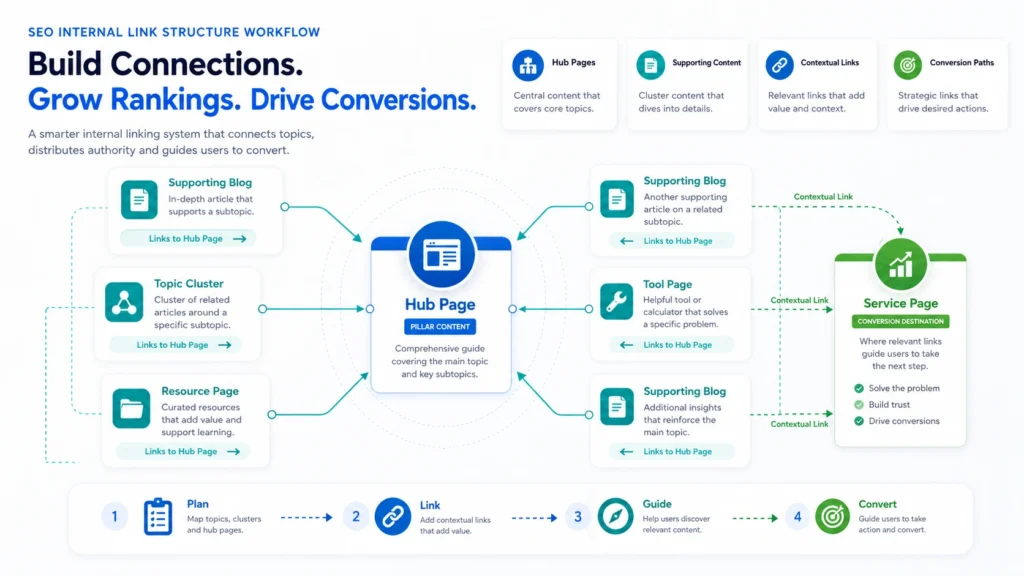
A practical internal-link structure can be built around three directions.
1. From the hub to supporting content
The pillar page should link downward to the most important supporting resources.
For example:
- SEO pillar guide → internal-linking guide
- SEO pillar guide → technical SEO guide
- SEO pillar guide → keyword-research guide
- SEO pillar guide → content optimisation guide
This allows readers to move from a broad overview into detailed instruction.
Supporting articles should link horizontally when the connection is genuinely useful.
An article about internal linking could link to a topical-map guide because readers need a clear content structure before deciding which pages should be connected.
Shahzeena’s guide on how to build a topical map for SEO explains that planning stage in greater detail.
3. From informational pages to relevant conversion pages
Informational articles can link toward tools, services or products when the destination addresses the reader’s next need.
The transition should be based on context rather than sales pressure.
For example:
If your site has hundreds of unstructured pages, a professional audit can help identify orphan pages, weak clusters and missed internal-link opportunities.
That transition is more useful than adding an unrelated “hire us today” link in the introduction.
How to Choose the Right Internal-Link Target
Before adding an internal link, ask five questions.
Is the destination closely relevant?
The linked page should expand, explain or help complete the point being discussed.
A shared keyword is not enough. The two pages should have a real conceptual relationship.
Does it satisfy the reader’s likely next question?
A useful internal link anticipates what the reader may need next.
A section about choosing anchor text could link to a detailed anchor-text guide. A section about building clusters could link to a topical-map tutorial.
Is the destination page strong enough?
Do not send users to a thin, outdated or unfinished page merely to increase its internal-link count.
Improve the destination first.
Does the destination match the intended URL?
Check for duplicate versions, HTTP and HTTPS variations, trailing-slash inconsistencies, redirecting URLs and parameters.
Google recommends using persistent, understandable URLs and avoiding unnecessary temporary parameters in internal links.
Does the link help rather than interrupt?
A link should fit naturally into the reading experience. It should not distract users from the primary purpose of the section.
Anchor Text SEO Without Keyword Stuffing
Anchor text is the visible, clickable wording of a link.
Google recommends making anchor text descriptive, concise and relevant to both the source page and destination page. Generic anchors such as “click here” provide less useful context.
Good internal anchor text might include:
- Internal Linking Checklist;
- Semantic Seo Guide;
- Free Seo Tools;
- Topical Map Tutorial;
- Complete Seo Playbook;
- Technical Seo Audit Process.
The anchor does not need to repeat the destination page’s exact primary keyword every time.
Natural variations are often clearer:
- Learn How To Map Related Topics;
- Build A Practical Topical Map;
- Plan Your Website’s Content Clusters;
- Topical-Map Creation Process.
Use the wording that best fits the sentence.
Avoid these anchor-text mistakes
- Repeating the exact same keyword excessively
- Linking every occurrence of a phrase
- Using anchors that misrepresent the destination
- Creating unnaturally long keyword-heavy anchors
- Using vague labels such as “here” without context
- Inserting links into sentences where they do not help the reader
Internal Linking Rules for New Blog Posts
A repeatable publishing process prevents internal linking from becoming an occasional clean-up task.
For each new article, consider the following framework.
Link to one parent or hub page
Identify the larger topic to which the article belongs.
A guide about internal links belongs within a wider SEO strategy, content architecture or topical-authority cluster.
The complete SEO playbook helps place internal linking within the wider SEO system.
Link to two or three supporting resources
Choose pages that explain concepts mentioned in the article but not covered in full.
The number is not a fixed SEO rule. Relevance and usefulness matter more than filling a quota.
Link to a tool or template where appropriate
When the article gives readers a task, direct them to a resource that helps complete it.
Shahzeena’s free SEO tools hub is relevant where readers need practical resources for planning or reviewing their work.
Add a money-page link only when justified
The commercial destination should solve a problem raised in the surrounding section.
Do not force a service link into every article.
Add links from older pages to the new article
This is one of the most frequently missed steps.
After publishing a new page, search existing content for:
- Direct Mentions Of The Topic;
- Sections Where The New Guide Provides Deeper Explanation;
- Older Articles Within The Same Cluster;
- High-Visibility Pages That Can Offer A Relevant Path To The New Resource.
This creates reverse links and prevents the new page from remaining isolated.
How to Improve Old Content With Internal Links
Existing content often contains more internal-link opportunities than a newly published article.
Start with pages that already receive impressions, visits, backlinks or regular user engagement. Review them for references to newer resources that did not exist when the page was written.
Use this process:
- List The Page’s Main And Supporting Topics.
- Identify Relevant Pages Published After It.
- Find Sentences Where Those Pages Would Genuinely Help.
- Add Descriptive Contextual Links.
- Confirm That Each Destination Resolves Correctly;
- Remove Or Replace Broken And Outdated Links;
- Review Whether The Page’s Most Important Next Step Is Visible.
Do not insert a new link merely because a keyword appears. Read the full paragraph and decide whether the destination continues the idea.
How to Link to Money Pages Naturally
A money-page link should match the reader’s level of awareness.
A beginner reading the definition of internal linking may not be ready to contact a consultant. A website owner reviewing an audit checklist and discovering hundreds of disconnected pages may be much closer to needing support.
Useful commercial transitions often appear in sections about:
- Implementation Difficulty;
- Large-Site Audits;
- Technical Limitations;
- Prioritisation;
- Strategy Validation;
- Recurring Maintenance;
- Problems Requiring Professional Diagnosis.
For help turning disconnected content into a structured SEO system, explore SEO consultant support.
That sentence works because it follows an implementation problem and clearly describes the service’s relevance.
A Practical Internal-Linking Workflow
Step 1: Assign a role to every important page
Classify each URL as one of the following:
- Pillar Page;
- Supporting Article;
- Tool Or Resource;
- Category Page;
- Commercial Page;
- Navigational Or Legal Page.
This prevents a page from receiving links simply because it exists.
Step 2: Group pages into topic clusters
Place pages that serve the same broad subject into one cluster.
Some pages may connect to more than one subject, but every link should still have a clear contextual reason.
Step 3: Select priority destinations
Within each cluster, identify:
- The Main Hub;
- The Strongest Supporting Resources;
- New Pages Needing Discovery;
- Strategic Service Or Product Pages;
- Outdated Pages That Should No Longer Receive Prominent Links.
Step 4: Write contextual anchors
Describe what the destination offers.
Do not optimise the anchor separately from the sentence. Write the sentence for the reader, then select the most descriptive natural phrase as the anchor.
Step 5: Add reverse links
When Page A links to a newly published Page B, determine whether Page B should also link back to Page A.
Bidirectional linking is not required in every case, but it is often useful when the pages serve different levels of the same subject.
Step 6: Record important links
For small sites, a spreadsheet may be enough.
Useful columns include:
- Source Url;
- Destination Url;
- Anchor Text;
- Page Role;
- Topic Cluster;
- Placement;
- Date Added;
- Review Status.
Step 7: Review the system periodically
Internal-link structures change as content is published, consolidated, redirected or removed.
Review priority clusters after major publishing rounds and site changes rather than waiting for links to become disorganised.
Internal-Link Map Example
Imagine a website with these five URLs:
- SEO strategy pillar page
- Internal-linking guide
- Topical-map guide
- Free SEO resources page
- SEO consulting page
A sensible model might be:
| Source page | Destination | Reason |
| SEO strategy pillar | Internal-linking guide | Provides detailed implementation |
| SEO strategy pillar | Topical-map guide | Explains cluster planning |
| Internal-linking guide | SEO strategy pillar | Returns readers to the wider system |
| Internal-linking guide | Topical-map guide | Supports content relationship planning |
| Internal-linking guide | SEO resources | Helps readers apply the process |
| Internal-linking guide | Consulting page | Serves users needing implementation help |
| Topical-map guide | Internal-linking guide | Explains how to connect the mapped pages |
| Resource hub | Relevant tutorials | Explains how each resource is used |
The model is deliberately selective. Not every page needs to link to every other page.
Common Internal-Linking Mistakes
Do not connect two articles simply because they belong to the general subject of marketing.
The relationship should be specific enough to help the user.
Sending most links to the homepage
The homepage is not always the best destination. Deep links to relevant guides, tools and service pages often provide a clearer next step.
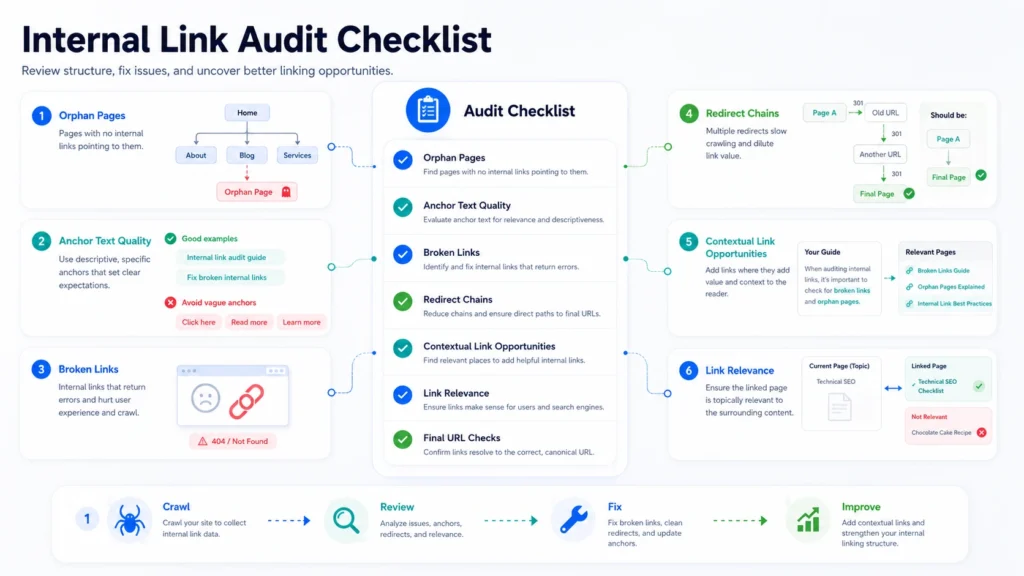
Creating orphan pages
An orphan page has no meaningful internal links pointing to it.
Sitemaps may help search engines identify URLs, but they do not replace a useful navigational and contextual structure. Google describes sitemaps as a way to provide information about important pages and their relationships, while internal links remain an important discovery and navigation mechanism.
Overusing exact-match anchors
Exact-match anchor text can be appropriate when it sounds natural, but repeating it in every link can make the content awkward and formulaic.
Linking through redirects
Update internal links to point directly to the final live URL whenever practical. Google specifically advises updating internal links during URL migrations.
Adding links only to new content
New content should receive links from relevant older pages. Otherwise, the website continually adds destinations without improving the routes leading to them.
Treating link quantity as the objective
A page with five useful links may serve readers better than a page with 30 weakly related links.
The objective is clear navigation and meaningful context.
Internal-Link Audit Checklist
Use this checklist when reviewing a page or cluster:
- Does the page link to its main parent topic?
- Do related supporting articles connect naturally?
- Can readers reach a useful next step?
- Are important pages receiving links from relevant content?
- Are any valuable pages orphaned?
- Is each anchor descriptive?
- Are anchors varied naturally?
- Do all destinations return the intended live page?
- Are links pointing through avoidable redirects?
- Are any links broken?
- Are URL parameters unnecessary?
- Are commercial links contextually justified?
- Are repeated template links overwhelming contextual links?
- Have older pages been updated to reference newer resources?
- Does every link help the reader navigate, understand or act?
How to Measure the Results
Internal-link improvements should be evaluated as part of the broader website system.
Useful observations include:
- Whether Important Pages Are Being Discovered And Indexed;
- Whether Orphan-Page Counts Decrease;
- Whether Users Visit Related Pages;
- Whether Important Landing Pages Receive More Internal Traffic;
- Whether Search Impressions And Queries Change Over Time;
- Whether Crawlers Can Reach Key Pages Through Normal Links;
- Whether Users Complete Relevant Actions After Following Links.
Avoid claiming that one added link directly caused a ranking increase. Search visibility can change because of content updates, external links, competition, technical changes, search-system changes and many other factors.
Use page-level and cluster-level trends, document your changes and evaluate the combined effect over a meaningful period.
Final Takeaway
Internal linking is most effective when treated as part of content architecture rather than a final publishing checkbox.
Start by assigning clear roles to your pages. Build topic clusters around useful pillar content. Connect supporting articles according to genuine relationships. Link tools to the instructions that make them useful. Introduce commercial pages only when they represent a logical next step.
Most importantly, update old content whenever new resources are published.
A strong internal-linking system should help a reader answer three questions:
- Where am I within this subject?
- What should I learn next?
- Where can I go when I am ready to act?
When your links answer those questions clearly, they support users, strengthen site organisation and give search engines better paths through your content.
Frequently Asked Questions
Internal linking is the practice of connecting one page of a website to another page on the same domain. It helps users discover related information and gives search engines crawlable paths between relevant pages.
Internal links connect related pages and clarify how broad and narrow topics fit together. They are most useful when the linked pages provide comprehensive, original and genuinely related information. Links alone do not make weak content authoritative.
There is no universal number that suits every article. Add links when they help readers understand a concept, explore a related topic or take a sensible next step. Relevance and usefulness matter more than meeting a fixed quota.
Use concise, descriptive wording that explains what the destination page contains. Natural partial-match phrases and contextual descriptions are usually more readable than repeatedly forcing the same exact-match keyword.
No. A money-page link should be included only when the product or service is relevant to the reader’s current problem or next decision. Forced commercial links can weaken the reading experience.
An orphan page is a page with no meaningful internal links pointing to it. It may be difficult for users to discover through normal navigation and may not be well integrated into the website’s topic structure.
Yes, when the new article adds useful information to a subject already discussed in the old post. Updating older pages creates discovery routes and helps integrate new content into existing clusters.
Internal links can support page discovery, site navigation, contextual understanding and the distribution of internal authority signals. However, no individual link guarantees a ranking improvement, because search performance depends on many factors.
Internal links generally do not need to open in a new tab. Keeping normal same-tab behaviour is usually predictable for users. A different behaviour should have a clear usability reason.
Review internal links after major content publishing, URL changes, redesigns or content consolidation. Large or frequently updated websites may benefit from scheduled audits, while smaller sites can review clusters during regular content updates.


